MCP for AI Agents
Expose your clusters and servers as Model Context Protocol servers.
Railgrid exposes your edges as Model Context Protocol (MCP) servers. AI coding assistants — Claude Code, Claude Desktop, Codex, Cursor, anything that speaks MCP — can list pods, describe deployments, run commands, and (with the edges provider’s service catalog) even control apps like Home Assistant across all your edges at once.
There are two endpoint shapes:
| Flag | Scope |
|---|---|
--mcpserver-name <name> | Aggregate — one endpoint spanning all matching edges: Kubernetes tools, Linux/SSH tools, and a list_targets tool to enumerate them. Backed by an MCPServer object in your workspace (one named default is created for you). |
--edge <edge-name> | Per-edge Kubernetes — an endpoint scoped to one Kubernetes edge. Server/Linux edges do not have a per-edge MCP URL; use the aggregate endpoint for Linux/SSH tools. |
Exactly one of the two flags is required.
Install the Railgrid skill
Before wiring up MCP, give your assistant the Railgrid skill. It teaches Claude Code and Codex how to log in, pick a workspace, find the MCP endpoint, and use the providers in it. Install the CLI , then run:
railgrid skills installThis fetches the skills/ directory from the railgrid repository
and writes every skill to ~/.claude/skills (Claude Code) and ~/.agents/skills (Codex). No git or GitHub token is required. Common variations:
| Command | Effect |
|---|---|
railgrid skills install railgrid --target claude | One skill for one client (claude or codex). |
railgrid skills install --scope project | Write to ./.claude/skills and ./.agents/skills in the current project instead of your home directory. |
railgrid skills install --dir ~/.cursor/skills | Write to any directory, for clients that scan a custom path. |
railgrid skills install --ref v0.1.30 | Pin a tag, branch, or commit instead of the default branch. |
railgrid skills list | Show what the repository offers, with -o json, -o yaml, or -o name. |
Re-running the command replaces skills it installed earlier. It refuses to overwrite a directory you authored yourself unless you pass --force, and it never replaces a symlink, so running it inside a checkout of the railgrid repository leaves the committed .agents/skills/railgrid link alone. See the skills command reference
for the marker file it writes and the error strings.
If you prefer the Claude Code plugin marketplace, the same skill is available as a plugin:
/plugin marketplace add railgrid/railgrid
/plugin install railgrid@railgridCodex has no marketplace; use railgrid skills install or copy skills/railgrid from the repository into ~/.agents/skills/railgrid by hand.
Get the URL
kubectl railgrid mcp url --mcpserver-name defaultThis prints the endpoint URL plus ready-to-paste setup snippets for Claude Code (claude mcp add), Claude Desktop (claude_desktop_config.json), and Codex (codex mcp add), with your bearer token filled in.
The URL shapes look like this:
# Aggregate (MCPServer object)
https://<hub>/services/mcpserver/<cluster>/apis/railgrid.ai/v1alpha1/mcpservers/<name>/mcp

# Per-edge Kubernetes (served by the edges provider)
https://<hub>/services/providers/edges/agent/<cluster>/apis/edges.railgrid.ai/v1alpha1/kubernetesclusters/<edge>/mcp<cluster> is your workspace’s logical cluster ID — the CLI derives it from your kubeconfig, so you never construct these by hand.
Adding to Claude Code
Paste the printed claude mcp add line straight into your shell:
claude mcp list # confirm it's registeredFor Claude Desktop, add the printed JSON snippet under mcpServers in claude_desktop_config.json and restart the app. For Codex, use the printed codex mcp add line. If the target is a Linux/server edge, use --mcpserver-name and let the aggregate endpoint expose its SSH tools; --edge accepts Kubernetes edges only.
The MCPServer object
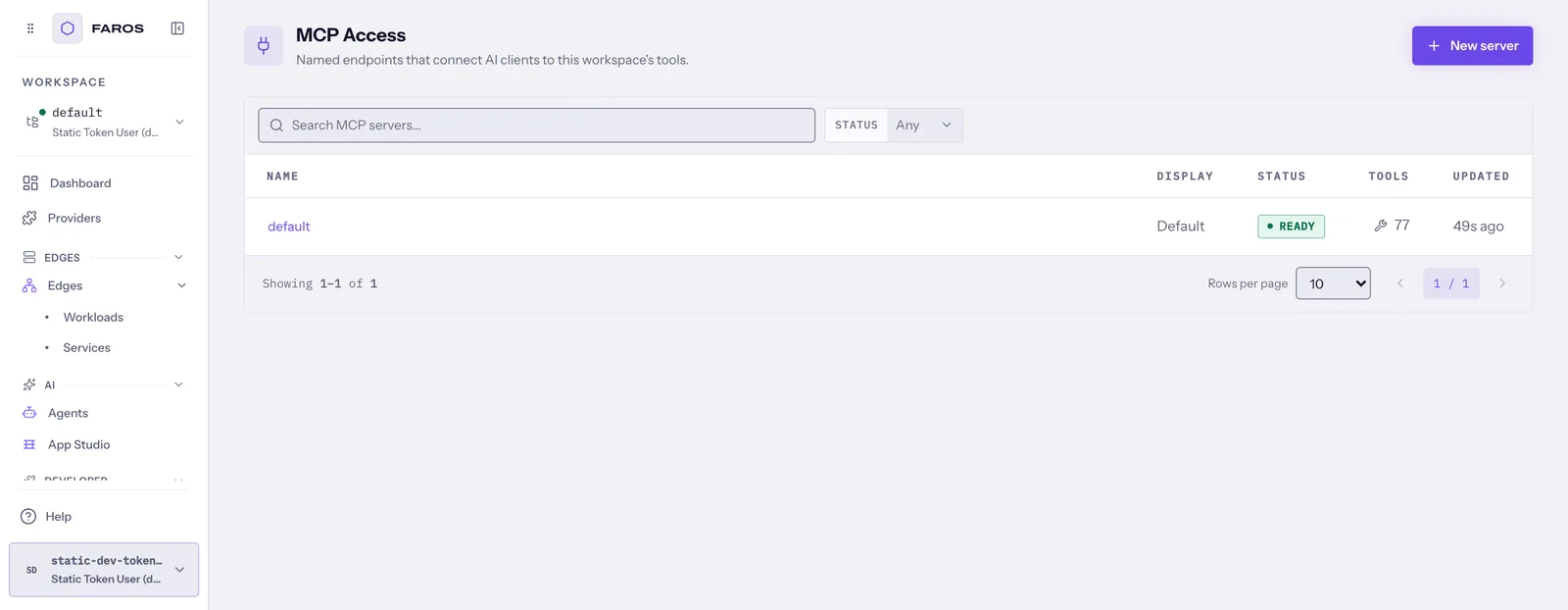
The aggregate endpoint is backed by an MCPServer custom resource (railgrid.ai/v1alpha1) in your workspace; the hub creates one named default in every new workspace. The current resource supports a display name, client instructions, and a readOnly hint. It does not currently have an edge label-selector field. Use separate named servers when you need distinct client-facing instructions:
kubectl get mcpservers.railgrid.aiapiVersion: railgrid.ai/v1alpha1
kind: MCPServer
metadata:
name: audit
spec:
displayName: Read-only audit assistant
readOnly: true
instructions: Ask before any operation that could change production state.Apply it in the selected workspace, then obtain its endpoint with kubectl railgrid mcp url --mcpserver-name audit.
Check provisioning and tool discovery without printing the token:
kubectl get mcpserver audit -o jsonpath='{.status.phase}{"\n"}{.status.conditions[*].message}{"\n"}'
kubectl get mcpserver audit -o jsonpath='{range .status.federatedProviders[*]}{.name}{" reachable="}{.reachable}{"\n"}{end}'Authentication for the aggregate endpoint uses a long-lived service-account token minted per MCPServer (referenced from status.tokenSecretRef) rather than your personal OIDC token — so long-running MCP connections don’t break when your browser token expires.
What tools are exposed
The aggregate endpoint federates tools from two sources:
- Edges: Kubernetes tools (via kubernetes-mcp-server
) for every connected Kubernetes edge, Linux/SSH tools for server edges, and per-service tools for any
Servicethe edges provider has discovered (e.g.ha_call_servicefor Home Assistant). - Providers: every enabled provider that exposes MCP contributes its tools, namespaced as
<provider>__<tool>— e.g.code__create_repository,kuery__kuery_query,infrastructure__provision.
Authentication and scoping
The aggregate endpoint uses its MCPServer service-account credential. Do not assume that it is identical to your personal session’s effective permissions. Before handing an endpoint to an assistant, inspect the endpoint’s status.federatedProviders, verify an allowed operation and a denied operation, and treat readOnly as a client/tooling hint. The current hub implementation provisions a broad placeholder role for the MCP service account, so readOnly: true is not a server-side authorization boundary; keep sensitive endpoints private and follow the service accounts
guidance.
To rotate an MCP credential, delete the MCPServer and recreate it with the same or a new name. Its owned ServiceAccount, token Secret, and binding are garbage-collected with the resource; wait for the replacement to reach Ready and update the client with a newly generated mcp url command. Revoke the old client configuration immediately after the replacement is working.